<br />
<b>Warning</b>:  strpos() expects parameter 1 to be string, array given in <b>/home/c8821829/public_html/mrtottoto.jp/wp-includes/blocks.php</b> on line <b>20</b><br />
<?xml version="1.0" encoding="UTF-8"?><rss version="2.0"
	xmlns:content="http://purl.org/rss/1.0/modules/content/"
	xmlns:wfw="http://wellformedweb.org/CommentAPI/"
	xmlns:dc="http://purl.org/dc/elements/1.1/"
	xmlns:atom="http://www.w3.org/2005/Atom"
	xmlns:sy="http://purl.org/rss/1.0/modules/syndication/"
	xmlns:slash="http://purl.org/rss/1.0/modules/slash/"
	>

<channel>
	<title>【raytrektab】タグの記事一覧｜ふたばなし【4コマ】</title>
	<atom:link href="https://mrtottoto.jp/tag/raytrektab/feed/" rel="self" type="application/rss+xml" />
	<link>https://mrtottoto.jp</link>
	<description>双子姉妹を愛するオリジナルキャラクターたちの4コマブログ</description>
	<lastBuildDate>Wed, 13 Jan 2021 14:29:17 +0000</lastBuildDate>
	<language>ja</language>
	<sy:updatePeriod>
	hourly	</sy:updatePeriod>
	<sy:updateFrequency>
	1	</sy:updateFrequency>
	<generator>https://wordpress.org/?v=5.9.10</generator>

<image>
	<url>https://mrtottoto.jp/wp-content/uploads/2021/04/cropped-android-chrome-512x512-1-1-32x32.png</url>
	<title>【raytrektab】タグの記事一覧｜ふたばなし【4コマ】</title>
	<link>https://mrtottoto.jp</link>
	<width>32</width>
	<height>32</height>
</image> 
	<item>
		<title>【イラストで比較】raytrektab 8インチモデル RT08WTは出先用</title>
		<link>https://mrtottoto.jp/diff_raytrektab/</link>
					<comments>https://mrtottoto.jp/diff_raytrektab/#respond</comments>
		
		<dc:creator><![CDATA[Mr.碧(AOI)]]></dc:creator>
		<pubDate>Tue, 05 Jan 2021 11:20:15 +0000</pubDate>
				<category><![CDATA[イラスト]]></category>
		<category><![CDATA[タブレット]]></category>
		<category><![CDATA[レビュー]]></category>
		<category><![CDATA[raytrektab]]></category>
		<category><![CDATA[raytrektab 8インチモデル RT08WT]]></category>
		<guid isPermaLink="false">https://mrtottoto.jp/?p=2974</guid>

					<description><![CDATA[raytrektab 8インチモデル、小さいWindowsが唯一の取り柄 あけましておめでとうございますMr.（@mrtottoto)です。 今回は持ち運び用に買ったタブレットについてのレビューです。ササッとアイデアを起]]></description>
										<content:encoded><![CDATA[
<div class="wp-container-2 wp-block-group">
<div class="wp-block-group__inner-container">
<h1 id="commonh1">raytrektab 8インチモデル、小さいWindowsが唯一の取り柄</h1>
<p>あけましておめでとうございますMr.（<a href="https://twitter.com/mrtottoto">@mrtottoto</a>)です。</p>
<p>今回は持ち運び用に買ったタブレットについてのレビューです。<br /><span class="marker-animation">ササッとアイデアを起こせる用のラフ画が描ける小さいタブレット</span>を探していたので、ちょうどよかったです。<br />スペックは不足してる感ありありですけど。</p>
<figure class="wp-block-image"><a href="https://mrtottoto.jp/wp-content/uploads/sum-2.jpg"><img width="662" height="337" class="wp-image-2995" src="https://mrtottoto.jp/wp-content/uploads/sum-2.jpg" alt="" /></a></figure>
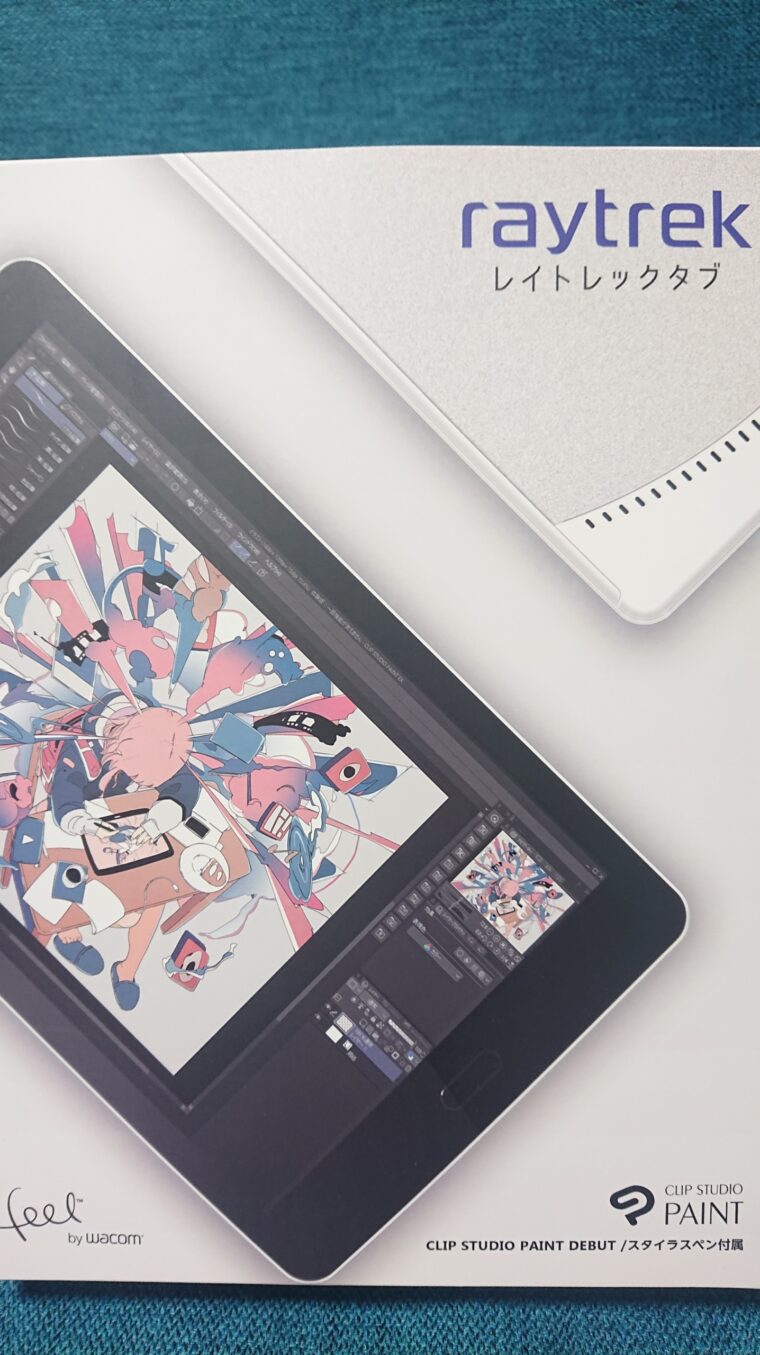
<p>そう、ドスパラのraytrektabです。</p>
<figure class="wp-block-image"><a href="https://mrtottoto.jp/wp-content/uploads/DSC_2948-scaled.jpg"><img width="574" height="1024" class="wp-image-2994" src="https://mrtottoto.jp/wp-content/uploads/DSC_2948-574x1024.jpg" alt="" /></a></figure>
<p>元々買いたいなーと思っていたタブレットでチェックしていたのですが、ちょうど2020年12月に新作で8インチのタブレットが出たのを知ってよりこっちのほうがいいじゃん！ということで購入決定しました。</p>
<p>旧型は10インチなのでちょっとサイズ大きめなんですよね。ただ、他のスペックはそこまで変化してないようで、メモリが8GB DDR4になっているくらいでしょうか？</p>
<h2 id="change_color">スペックは安かろう悪かろう</h2>
<figure class="wp-block-image"><a href="https://mrtottoto.jp/wp-content/uploads/price.jpg"><img width="662" height="674" class="wp-image-2996" src="https://mrtottoto.jp/wp-content/uploads/price.jpg" alt="" /></a></figure>
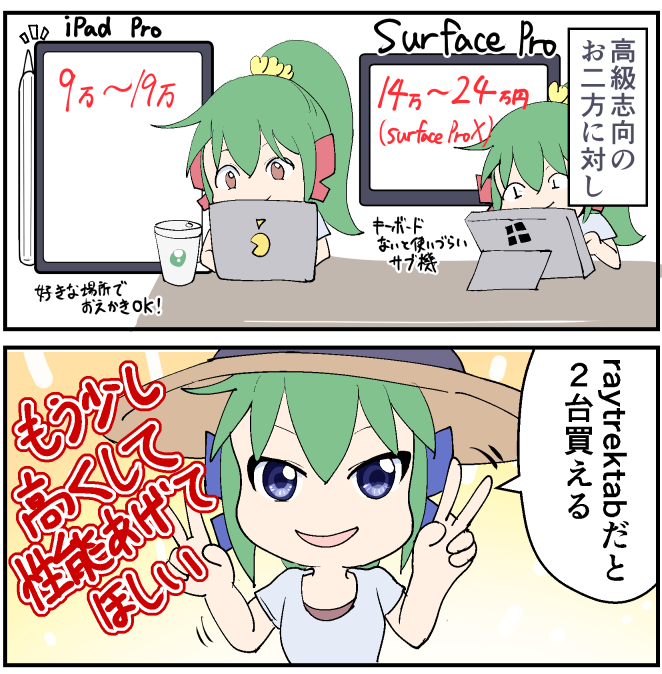
<p>値段49,800円（税抜）で割とリーズナブルな価格故なのか、メモリは8GBとwindows10 64bitを動かすための最低限は設備している感じ。<br />メモリも120GBで実際に使えるのは80GBくらいなので、クラウドを活用しながら作品を保存して使うのが必要だろう。</p>
<p>デスクトップでやっている作業を行うことはできないだろう（３Dとか大量レイヤーとか）。１色１レイヤーの私には色塗りまでできない…</p>
<p>（そもそもレイヤー管理できるほど画面が広くないのも理由である）</p>
<p><span class="marker-animation">本当にラフ、がんばって線画までのタブレットとして使える。</span></p>
<h2 id="change_color">比較対象のタブレット</h2>
<p>今回の比較対象としてあげられるのは以下の2つだろう。</p>
<p>ipad pro 第二世代（11インチ/12.3インチ）<br />→お絵かきといえば！の代表作。あとデザイン系の人はmacが多いと聞く</p>
<p>surface<br />→同じwindowsでタブレットで描けるものといえばsurfaceではないでしょうか</p>
<h2 id="change_color">ペンは細めでハード。持ち運び方に悩む</h2>
<figure class="wp-block-image"><a href="https://mrtottoto.jp/wp-content/uploads/pen.jpg"><img width="662" height="674" class="wp-image-2997" src="https://mrtottoto.jp/wp-content/uploads/pen.jpg" alt="" /></a></figure>
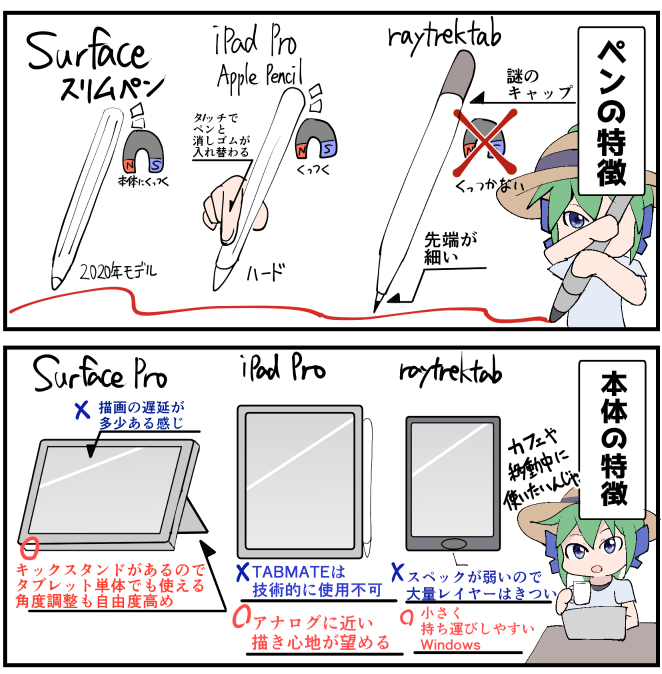
<p>raytrektabのペンは細めでハード。ただ、ペン先と画面の差はそこまで違和感を感じていないので今の所問題なし。</p>
<p>ただ、<span class="marker-animation">iPad Proと違ってペンが本体にくっつかないので、裸の状態だとペンの持ち運びに苦労してしまう</span>。カバーをつけてもいいけど、カバーをつけると大きくなってスーツの内ポケットには入らなくなるから悩ましい。</p>
<p>あと、ペンにキャップがついてるけど正直いらない。ペン先をガードするためだろうけど、出先で落としそうだから最初から外しときたい。</p>
<h2 id="change_color">アクションセンターの消し方</h2>
<p>左利きにはあまり影響がない話かもですが、私は右利きなので右手の手のひらによる誤作動で「アクションセンター」が横からびぃ―んって開く現象にイライラしました</p>
<a href="https://mrtottoto.jp/wp-content/uploads/action.jpg"><img class="alignnone  wp-image-3003" src="https://mrtottoto.jp/wp-content/uploads/action.jpg" alt="" width="665" height="673" /></a>
<p>これはキレてもいいレベル。<br />タブレット愛用家の皆様はもしかしたら、誤作動対策の手袋を着用して使っているので気にならなかったかもしれません。<br />しかし私の場合はふとした出先で使う想定なので毎回使うたびに手袋装着！シャキーン！と気合入れるわけにはいかない…</p>
<p>というわけでアクションセンターくんには消えてもらいましょう。</p>
<h3 id="hukidasi">ローカルグループポリシーエディターの起動</h3>
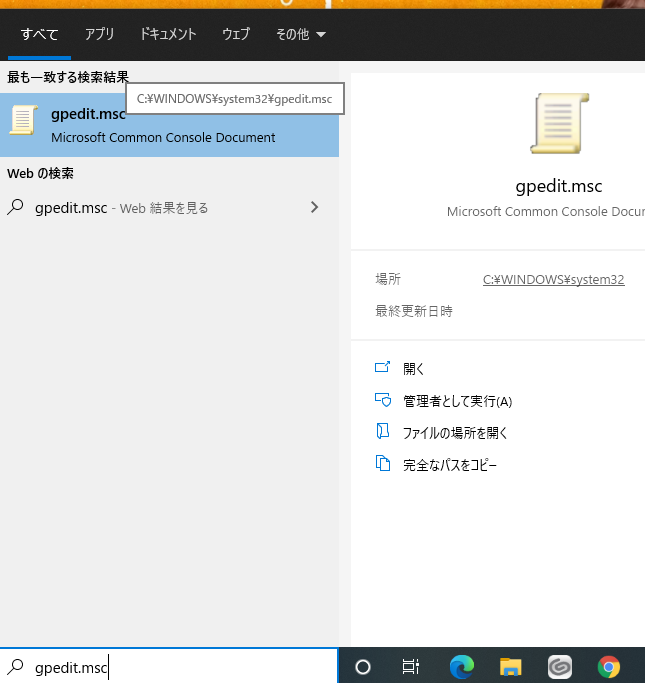
<p>１．検索バーに「<strong>gpedit」を入力</strong></p>
<figure class="wp-block-image"><a href="https://mrtottoto.jp/wp-content/uploads/1.png"><img width="645" height="683" class="wp-image-2984" src="https://mrtottoto.jp/wp-content/uploads/1.png" alt="" /></a></figure>
<p>２．「グループポリシーの編集(gpedit.msc)」をクリック</p>
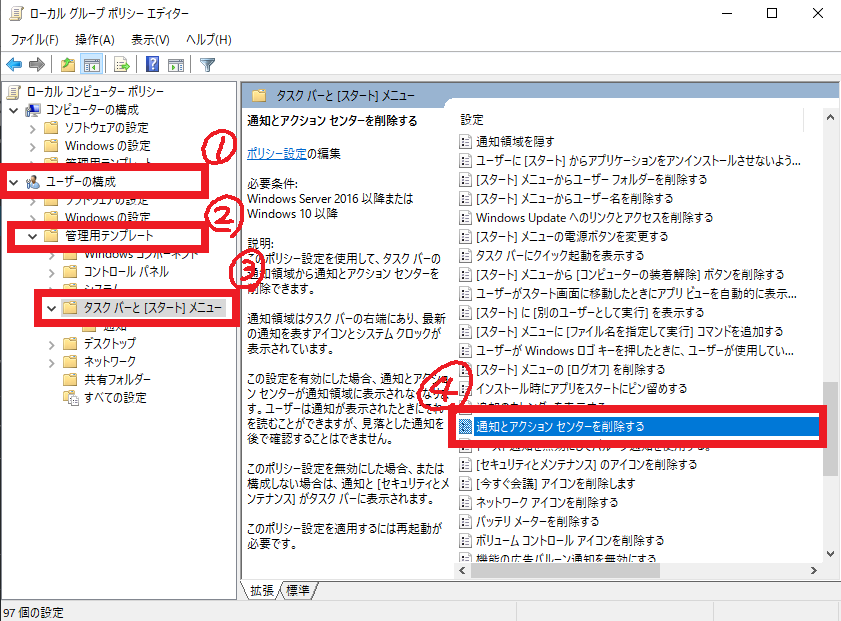
<p>３．ユーザーの構成＞管理テンプレート＞タスクバーと[スタートメニュー]<br />「通知とアクションセンターを削除する」を有効にする</p>
<figure class="wp-block-image"><a href="https://mrtottoto.jp/wp-content/uploads/2.png"><img width="841" height="621" class="wp-image-2985" src="https://mrtottoto.jp/wp-content/uploads/2.png" alt="" /></a></figure>
<figure class="wp-block-image"><a href="https://mrtottoto.jp/wp-content/uploads/3.png"><img width="688" height="636" class="wp-image-2986" src="https://mrtottoto.jp/wp-content/uploads/3.png" alt="" /></a></figure>
<p>これで右からひょっこりはんしなくなります。</p>
<h2 id="change_color">左手デバイス（TABMATE）が使える！</h2>
<a href="https://mrtottoto.jp/wp-content/uploads/tabmate.jpg"><img class="alignnone  wp-image-3007" src="https://mrtottoto.jp/wp-content/uploads/tabmate.jpg" alt="" width="754" height="764" /></a>
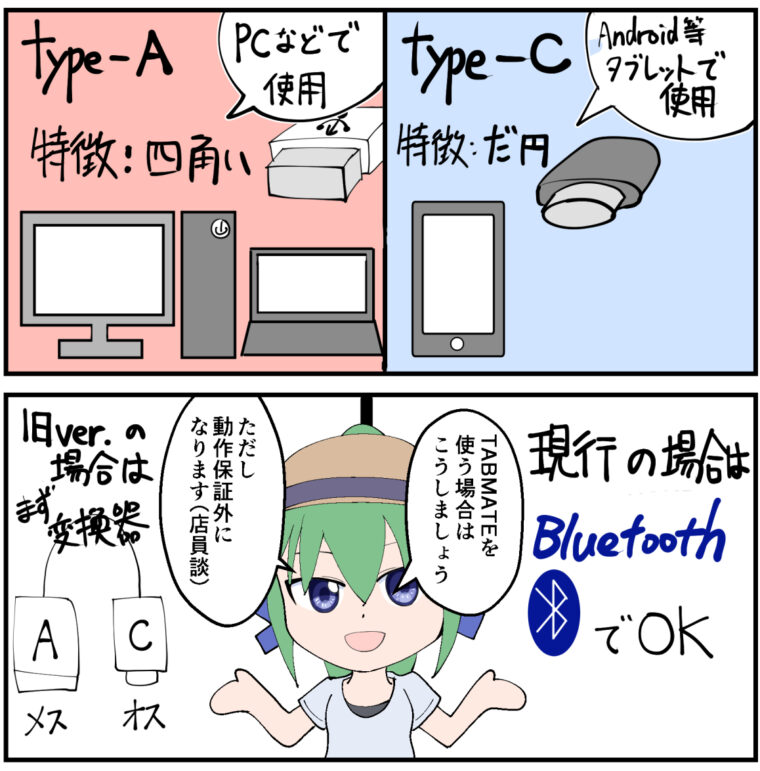
<p>ipad pro と一番違うのがやはりOSの違い。<br />クリスタを出している株式会社CELSYSはクリスタ用の左手デバイスTABMATEを出しているが、これが技術的な問題でipadでは使えないのである。</p>
<p>それがraytrektabであればwindowsなので左手デバイスが使えるので、出先のカフェでもがっつり効率よく作業することができる。</p>
<p>これは非常に大きい！</p>
<p>と思ったが、実はこのraytrektab…USBポートがtype-Cなので要注意！<br />なのでtypeA（オス）である左手デバイスをraytrektabのtypeC(メス）に差し込む変換器が必要になります。</p>
<p>bluetoothが使えるデバイスであれば、blootooth接続のほうが楽ですね。</p>
<p>余談ですが、typeC（オス）→typeA(メス）は規格外なので使用してはいけないようですが、今回はその対象ではないので問題ありません<br />この辺のお話が気になる方はこちらのサイトとか参考になりますよ</p>
<p><div class="linkcard"><div class="lkc-external-wrap"><a class="lkc-link no_icon" href="https://8vivid.net/usb-c-to-usb-a/#USB-C_to_USB-A" target="_blank" rel="external noopener"><div class="lkc-card"><div class="lkc-content"><figure class="lkc-thumbnail"><img class="lkc-thumbnail-img" src="//mrtottoto.jp/wp-content/uploads/pz-linkcard/cache/4ccfe97be28920a0206fd6c8a4bcab937d9b4758e684893251c8ba392ca1cac5.jpeg" alt="" /></figure><div class="lkc-title"><div class="lkc-title-text">危険！USB-C→USB-A変換アダプターは“規格外”だぞ！！｜8vivid</div></div><div class="lkc-excerpt">CをAに変換してはいけない！ Amazonなどを見てると、USB Type-CをUSB Type-Aに変換するアダプターが売られています。これ、USBの“規格違反”なので使うと危険ですぞ。 ContentsUSB-C t</div></div><div class="lkc-info"><img class="lkc-favicon" src="https://www.google.com/s2/favicons?domain=8vivid.net" alt="" width=16 height=16 /><div class="lkc-domain">8vivid</div></div><div class="clear"></div></div></a></div></div></p>
<p>ただ、お店の人は左手デバイスは負荷がかかるので、動作保証しかねると回答されていたので、動いたらラッキーくらいの感覚でお願いします。</p>
</div>
<p>&nbsp;</p>
<div class="wp-block-group__inner-container">
<p>ブログランキングに参加しています クリックして応援してね！▼ <a href="//blog.with2.net/link/?1998049"><img title="人気ブログランキング" src="https://blog.with2.net/user-banner/?id=1998049&amp;seq=2" /></a></p>
</div>
</div>
]]></content:encoded>
					
					<wfw:commentRss>https://mrtottoto.jp/diff_raytrektab/feed/</wfw:commentRss>
			<slash:comments>0</slash:comments>
		
		
			</item>
	</channel>
</rss>