<br />
<b>Warning</b>:  strpos() expects parameter 1 to be string, array given in <b>/home/c8821829/public_html/mrtottoto.jp/wp-includes/blocks.php</b> on line <b>20</b><br />
<?xml version="1.0" encoding="UTF-8"?><rss version="2.0"
	xmlns:content="http://purl.org/rss/1.0/modules/content/"
	xmlns:wfw="http://wellformedweb.org/CommentAPI/"
	xmlns:dc="http://purl.org/dc/elements/1.1/"
	xmlns:atom="http://www.w3.org/2005/Atom"
	xmlns:sy="http://purl.org/rss/1.0/modules/syndication/"
	xmlns:slash="http://purl.org/rss/1.0/modules/slash/"
	>

<channel>
	<title>【GoogleAdsense】タグの記事一覧｜ふたばなし【4コマ】</title>
	<atom:link href="https://mrtottoto.jp/tag/googleadsense/feed/" rel="self" type="application/rss+xml" />
	<link>https://mrtottoto.jp</link>
	<description>双子姉妹を愛するオリジナルキャラクターたちの4コマブログ</description>
	<lastBuildDate>Mon, 31 Dec 2018 01:19:53 +0000</lastBuildDate>
	<language>ja</language>
	<sy:updatePeriod>
	hourly	</sy:updatePeriod>
	<sy:updateFrequency>
	1	</sy:updateFrequency>
	<generator>https://wordpress.org/?v=5.9.10</generator>

<image>
	<url>https://mrtottoto.jp/wp-content/uploads/2021/04/cropped-android-chrome-512x512-1-1-32x32.png</url>
	<title>【GoogleAdsense】タグの記事一覧｜ふたばなし【4コマ】</title>
	<link>https://mrtottoto.jp</link>
	<width>32</width>
	<height>32</height>
</image> 
	<item>
		<title>GoogleAdsenseの警告に対応する（一部広告非表示Ver）</title>
		<link>https://mrtottoto.jp/googlead/</link>
					<comments>https://mrtottoto.jp/googlead/#respond</comments>
		
		<dc:creator><![CDATA[Mr.碧(AOI)]]></dc:creator>
		<pubDate>Mon, 31 Dec 2018 01:19:53 +0000</pubDate>
				<category><![CDATA[雑記]]></category>
		<category><![CDATA[GoogleAdsense]]></category>
		<guid isPermaLink="false">https://mrtottoto.jp/?p=833</guid>

					<description><![CDATA[GoogleAdsenseの警告に対応する 年の瀬にGoogleから警告が来ました 一体私が何をしたっていうのか…と内容を確認したら 「あなたのサイトの一部がポリシー違反しているので、広告を一時的に停止させていただいてい]]></description>
										<content:encoded><![CDATA[<h1 id="first-letter">GoogleAdsenseの警告に対応する</h1>
<p>年の瀬にGoogleから警告が来ました<br />
一体私が何をしたっていうのか…と内容を確認したら<br />
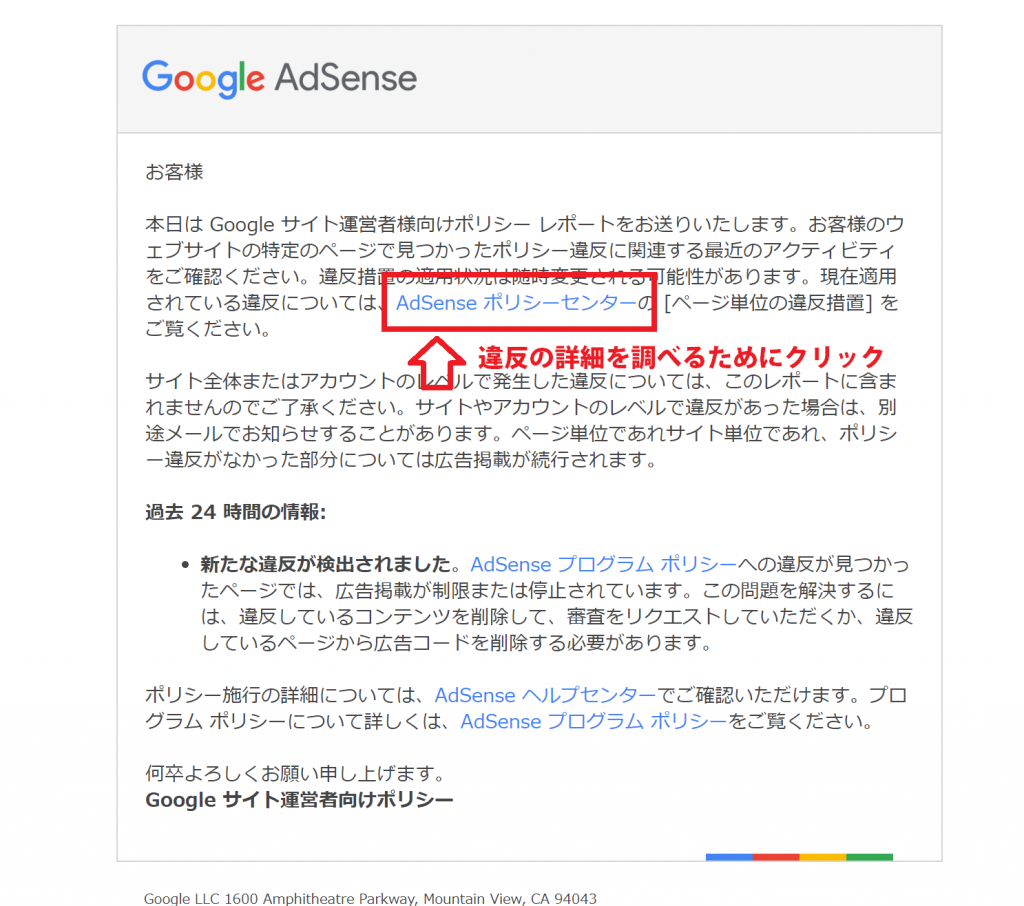
「あなたのサイトの一部がポリシー違反しているので、広告を一時的に停止させていただいています」</p>
<p><img class="alignnone size-large wp-image-834" src="https://mrtottoto.jp/wp-content/uploads/2018/12/keikoku-1024x906.png" alt="" width="1024" height="906" srcset="https://mrtottoto.jp/wp-content/uploads/2018/12/keikoku-1024x906.png 1024w, https://mrtottoto.jp/wp-content/uploads/2018/12/keikoku-300x266.png 300w, https://mrtottoto.jp/wp-content/uploads/2018/12/keikoku-768x680.png 768w, https://mrtottoto.jp/wp-content/uploads/2018/12/keikoku.png 1487w, https://mrtottoto.jp/wp-content/uploads/2018/12/keikoku-1024x906.png 856w" sizes="(max-width: 1024px) 100vw, 1024px" /><br />
とのこと。<br />
めっちゃ見に覚えあるー<br />
いつか直面する問題だと思っていたら思いの外来るのが早かったです。</p>
<p>さて、警告が来たらもう逃げも隠れもできないので、対応しなければならない。<br />
私の中での認識では「<strong>サイトに一部でもポリシー違反があるとOUT!</strong>」だと思っていたのですが、<br />
「<strong>違反しているページの広告を削除すればOK</strong>」的な文面も見受けられます。<br />
…ということは、同人系の部分のページは広告非表示にすればすんなりうまくいく…？</p>
<p>ここでは、<br />
<strong>メインページには広告を維持させたいが、サブコンテンツでポリシー違反に引っかかる場合どうすべきか。</strong><br />
をもとに対処法を説明していきます。</p>
<h2 id="perorisheet">違反確認の手順</h2>
<p>まずは「Adsenseポリシーセンター」のリンクをクリックして詳細を見ていきます。</p>
<img class="alignnone size-large wp-image-841" src="https://mrtottoto.jp/wp-content/uploads/2018/12/mailto1-1024x598.png" alt="" width="1024" height="598" srcset="https://mrtottoto.jp/wp-content/uploads/2018/12/mailto1-1024x598.png 1024w, https://mrtottoto.jp/wp-content/uploads/2018/12/mailto1-300x175.png 300w, https://mrtottoto.jp/wp-content/uploads/2018/12/mailto1-768x449.png 768w, https://mrtottoto.jp/wp-content/uploads/2018/12/mailto1.png 760w, https://mrtottoto.jp/wp-content/uploads/2018/12/mailto1-1024x598.png 856w" sizes="(max-width: 1024px) 100vw, 1024px" />
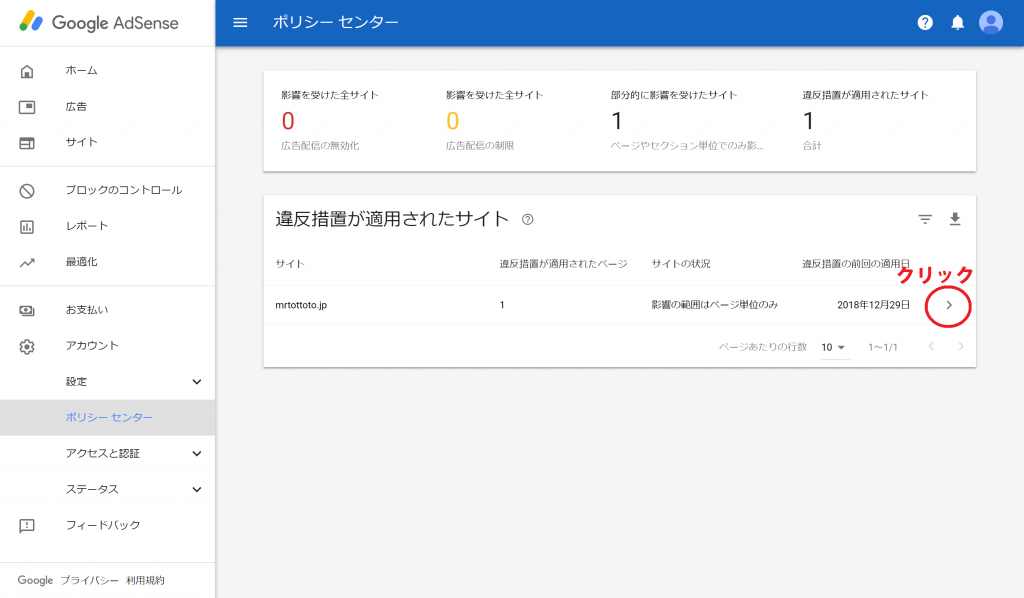
<p>先程のリンクをクリックするとこのようなページが表示されるかと思われます。（ログイン済み前提）<br />
画像の赤丸部分をクリックします。<br />
<img class="alignnone size-large wp-image-842" src="https://mrtottoto.jp/wp-content/uploads/2018/12/mailto2-1024x603.png" alt="" width="1024" height="603" srcset="https://mrtottoto.jp/wp-content/uploads/2018/12/mailto2-1024x603.png 1024w, https://mrtottoto.jp/wp-content/uploads/2018/12/mailto2-300x177.png 300w, https://mrtottoto.jp/wp-content/uploads/2018/12/mailto2-768x452.png 768w, https://mrtottoto.jp/wp-content/uploads/2018/12/mailto2.png 760w, https://mrtottoto.jp/wp-content/uploads/2018/12/mailto2-1024x603.png 856w" sizes="(max-width: 1024px) 100vw, 1024px" /></p>
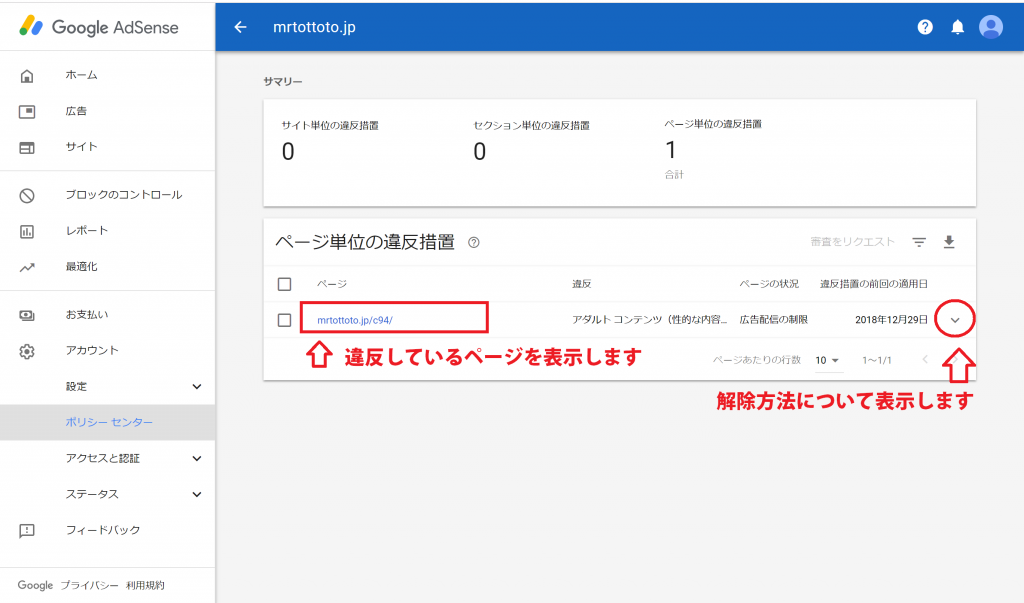
<p>ここでは、サイトのページ単位で違反コンテンツについて表示されています。<br />
URLをクリックすると違反ページを開くことができます。<br />
右側の赤丸をクリックすると違反の解除方法について詳細を出してくれます。<br />
まずは赤丸部分をクリックして解除方法について確認してみます。</p>
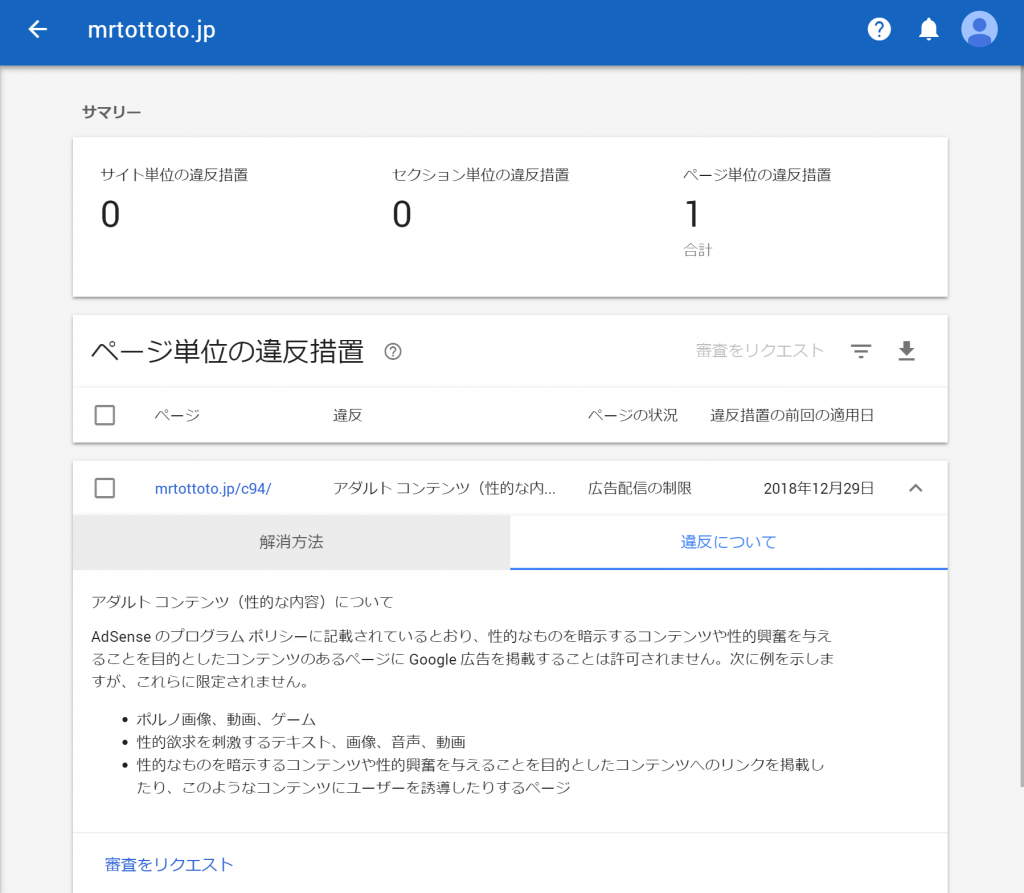
<img class="alignnone size-large wp-image-835" src="https://mrtottoto.jp/wp-content/uploads/2018/12/aboutihan-1024x893.png" alt="" width="1024" height="893" srcset="https://mrtottoto.jp/wp-content/uploads/2018/12/aboutihan-1024x893.png 1024w, https://mrtottoto.jp/wp-content/uploads/2018/12/aboutihan-300x262.png 300w, https://mrtottoto.jp/wp-content/uploads/2018/12/aboutihan-768x670.png 768w, https://mrtottoto.jp/wp-content/uploads/2018/12/aboutihan.png 760w, https://mrtottoto.jp/wp-content/uploads/2018/12/aboutihan-1024x893.png 856w" sizes="(max-width: 1024px) 100vw, 1024px" />
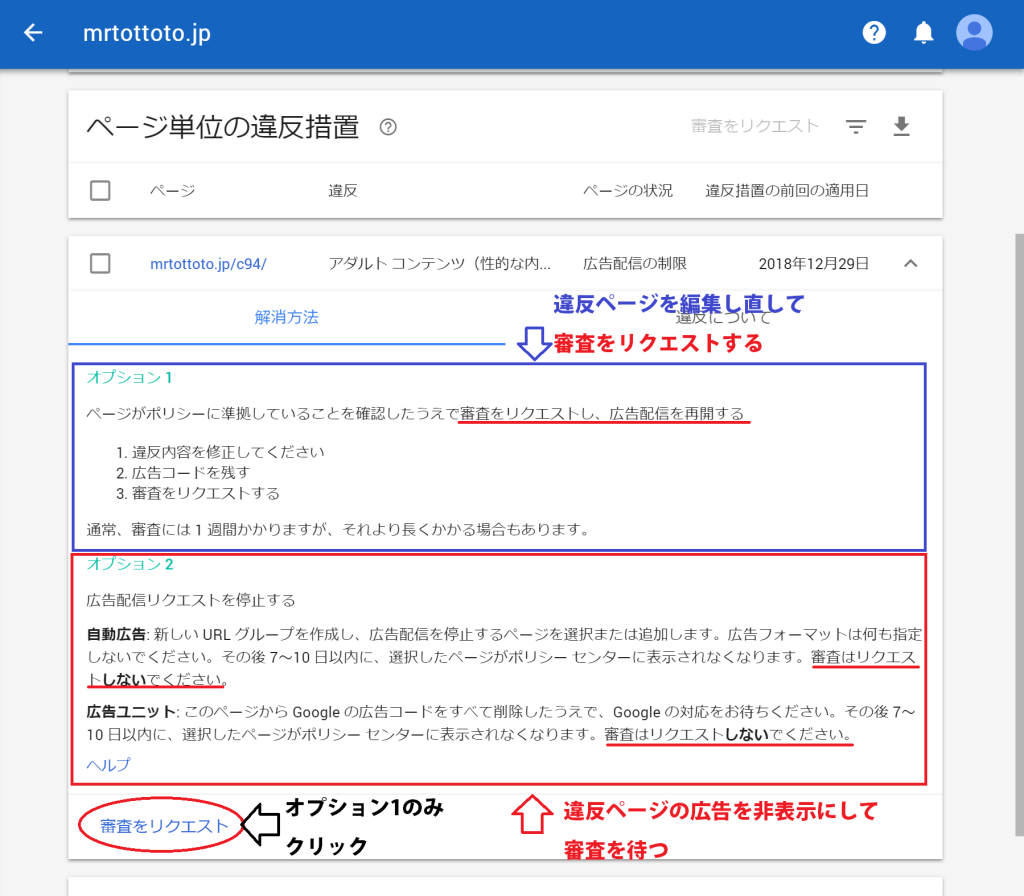
<p>赤丸部分をクリックしてみました。</p>
<h2 id="perorisheet">対処方法は２つ！</h2>
<img class="alignnone size-large wp-image-840" src="https://mrtottoto.jp/wp-content/uploads/2018/12/kaizyo-1024x896.png" alt="" width="1024" height="896" srcset="https://mrtottoto.jp/wp-content/uploads/2018/12/kaizyo-1024x896.png 1024w, https://mrtottoto.jp/wp-content/uploads/2018/12/kaizyo-300x263.png 300w, https://mrtottoto.jp/wp-content/uploads/2018/12/kaizyo-768x672.png 768w, https://mrtottoto.jp/wp-content/uploads/2018/12/kaizyo.png 760w, https://mrtottoto.jp/wp-content/uploads/2018/12/kaizyo-1024x896.png 856w" sizes="(max-width: 1024px) 100vw, 1024px" />
<p>解除には２パターン方法があるみたいですね。２パターンをそれぞれ要約すると</p>
<p><strong><span style="font-size: 14pt;">オプション１は、「違反内容を修正し、審査をリクエストする」</span></strong><br />
<strong><span style="font-size: 14pt;">オプション２は、「違反ページの広告を非表示にする」</span></strong></p>
<p>になります。<br />
私はコンテンツの維持を優先させたいので、<strong><span style="font-size: 14pt;">オプション２</span></strong><span style="font-size: 12pt;">で進めていきます。<br />
注意してほしいのは、オプション２の場合は「<span style="color: #ff0000;"><strong><span style="font-size: 14pt;">審査をリクエストを押さない</span></strong></span>」ことです。</span></p>
<p>オプション２は<strong>自動広告と広告ユニット</strong>の場合とで対応手順が多少異なるみたいです。<br />
私は<strong><span style="font-size: 14pt;">広告ユニット</span></strong>でしたので、広告ユニットのやり方で「Googleのコードをすべて削除する」をベースで説明していきます。</p>
<img class="alignnone size-large wp-image-843" src="https://mrtottoto.jp/wp-content/uploads/2018/12/Google-AdSense-Google-Chrome-2018_12_31-9_13_18-1024x595.png" alt="" width="1024" height="595" srcset="https://mrtottoto.jp/wp-content/uploads/2018/12/Google-AdSense-Google-Chrome-2018_12_31-9_13_18-1024x595.png 1024w, https://mrtottoto.jp/wp-content/uploads/2018/12/Google-AdSense-Google-Chrome-2018_12_31-9_13_18-300x174.png 300w, https://mrtottoto.jp/wp-content/uploads/2018/12/Google-AdSense-Google-Chrome-2018_12_31-9_13_18-768x446.png 768w, https://mrtottoto.jp/wp-content/uploads/2018/12/Google-AdSense-Google-Chrome-2018_12_31-9_13_18.png 760w, https://mrtottoto.jp/wp-content/uploads/2018/12/Google-AdSense-Google-Chrome-2018_12_31-9_13_18-1024x595.png 856w" sizes="(max-width: 1024px) 100vw, 1024px" />
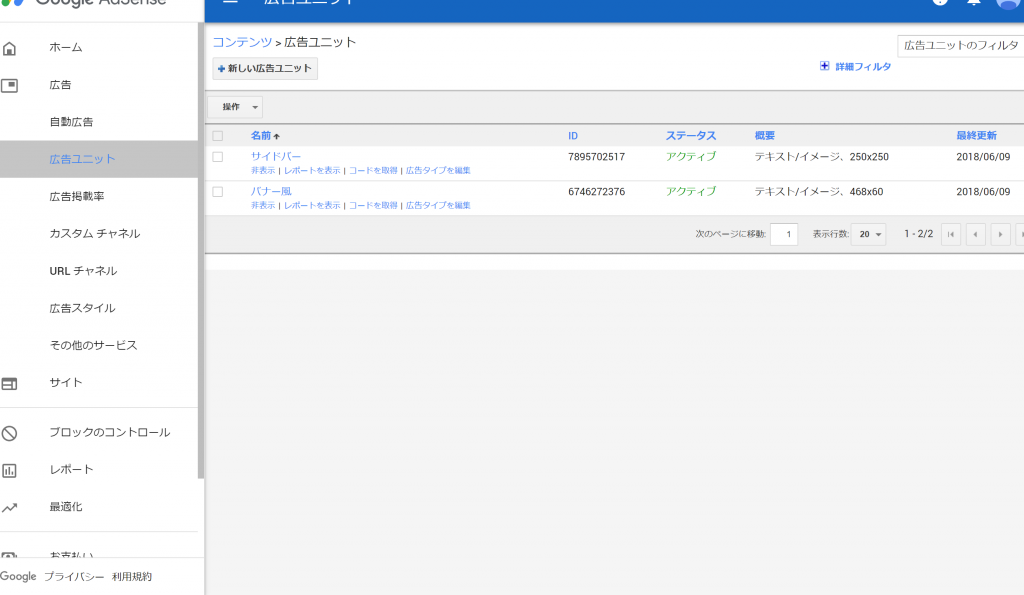
<p>ちなみに、自身の広告がどうなっているかは</p>
<p>「広告」&gt;「自動広告」or「広告ユニット」</p>
<p>で探せると思います。自分はサイドバーとページの一番下にバナーとして設置するようにしていたみたいです（６ヶ月も前の話は覚えてない）</p>
<p>さて、どうやって広告を非表示にすればいいのか…</p>
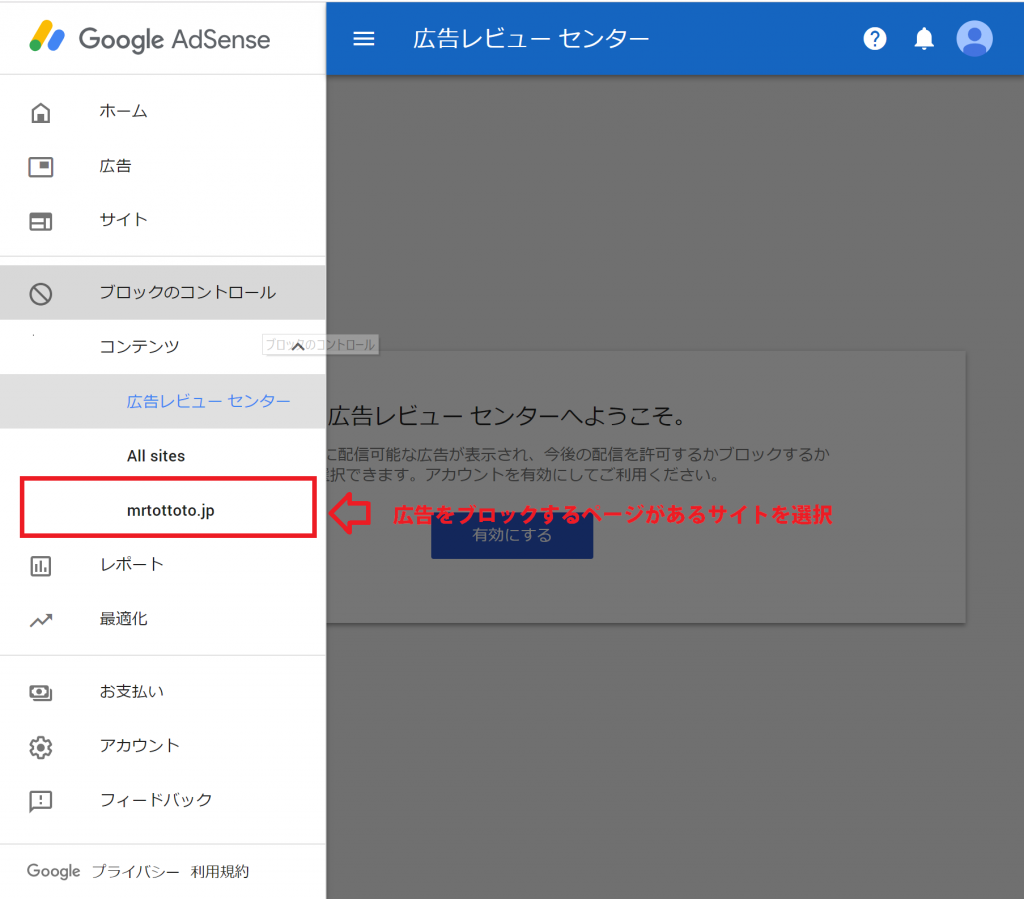
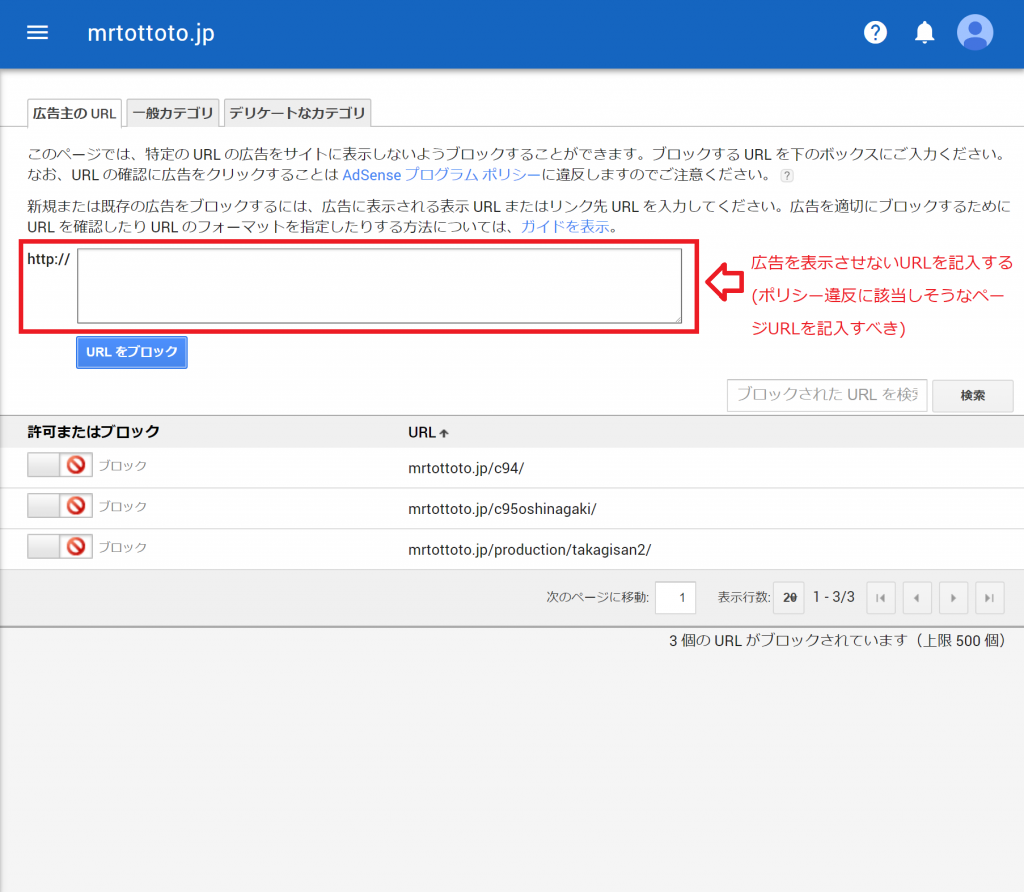
<h3 id="hukidasi">1.ブロックのコントロールから広告をブロックするURLを入力</h3>
<img class="alignnone size-large wp-image-837" src="https://mrtottoto.jp/wp-content/uploads/2018/12/blockcontrol-1024x899.png" alt="" width="1024" height="899" srcset="https://mrtottoto.jp/wp-content/uploads/2018/12/blockcontrol-1024x899.png 1024w, https://mrtottoto.jp/wp-content/uploads/2018/12/blockcontrol-300x263.png 300w, https://mrtottoto.jp/wp-content/uploads/2018/12/blockcontrol-768x674.png 768w, https://mrtottoto.jp/wp-content/uploads/2018/12/blockcontrol.png 760w, https://mrtottoto.jp/wp-content/uploads/2018/12/blockcontrol-1024x899.png 856w" sizes="(max-width: 1024px) 100vw, 1024px" />
<img class="alignnone size-large wp-image-836" src="https://mrtottoto.jp/wp-content/uploads/2018/12/adsensesetting-1024x892.png" alt="" width="1024" height="892" srcset="https://mrtottoto.jp/wp-content/uploads/2018/12/adsensesetting-1024x892.png 1024w, https://mrtottoto.jp/wp-content/uploads/2018/12/adsensesetting-300x261.png 300w, https://mrtottoto.jp/wp-content/uploads/2018/12/adsensesetting-768x669.png 768w, https://mrtottoto.jp/wp-content/uploads/2018/12/adsensesetting.png 760w, https://mrtottoto.jp/wp-content/uploads/2018/12/adsensesetting-1024x892.png 856w" sizes="(max-width: 1024px) 100vw, 1024px" />
<p>広告をブロックしたいURLを入力する。</p>
<h3 id="hukidasi">2.プラグイン「<strong>AdSense Integration WP QUADS」を活用する</strong></h3>
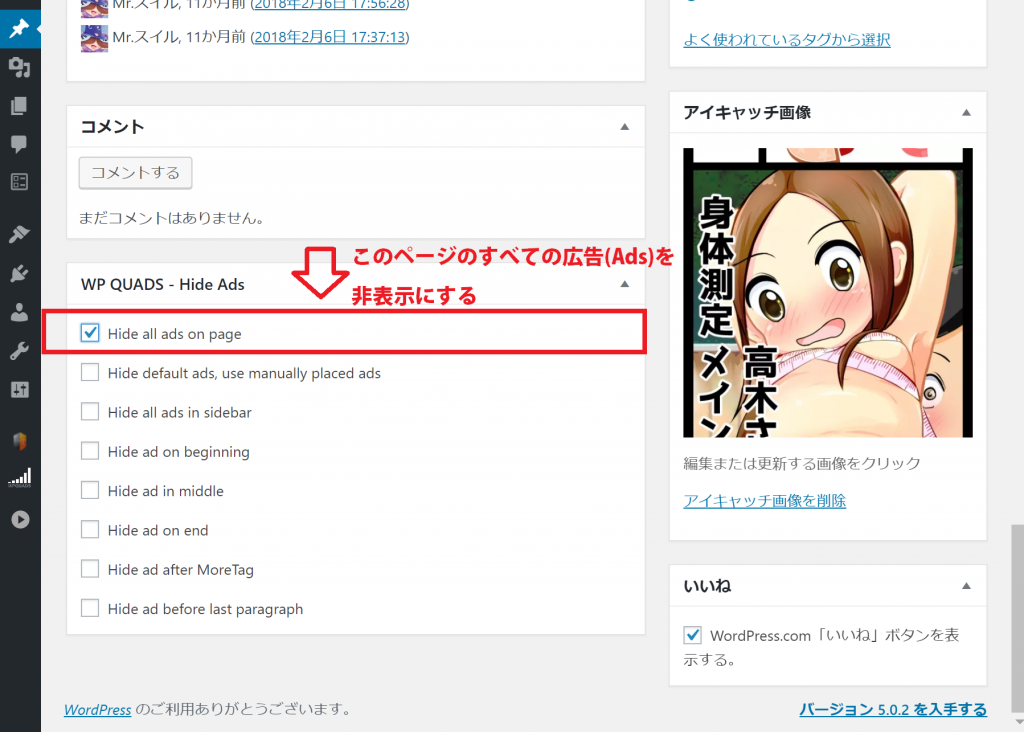
<p>プラグイン<strong>「AdSense Integration WP QUADS」</strong>を使うと、ページ単位で広告を隠す設定をすることができます。<br />
<img class="alignnone size-large wp-image-839" src="https://mrtottoto.jp/wp-content/uploads/2018/12/hide_adsdesu-1024x732.png" alt="" width="1024" height="732" srcset="https://mrtottoto.jp/wp-content/uploads/2018/12/hide_adsdesu-1024x732.png 1024w, https://mrtottoto.jp/wp-content/uploads/2018/12/hide_adsdesu-300x214.png 300w, https://mrtottoto.jp/wp-content/uploads/2018/12/hide_adsdesu-768x549.png 768w, https://mrtottoto.jp/wp-content/uploads/2018/12/hide_adsdesu.png 760w, https://mrtottoto.jp/wp-content/uploads/2018/12/hide_adsdesu-1024x732.png 856w" sizes="(max-width: 1024px) 100vw, 1024px" /></p>
<p>一番上のチェックボックスにチェックを入れるとそのページに表示される広告が非表示になります。<br />
実際にひっかかったページについて再編集していきます。</p>
<p>まぁ、アイキャッチからわかるようにアダルト要素が入っていてもおかしくないですからねぇ…<br />
おとなしく広告を非表示にさせていただきます。<br />
加えて、違反に該当しそうなコンテンツを含む他のページも設定し直さなくちゃ…</p>
<p>以上、広告の設定について説明してきました。<br />
結果についてはまた分かり次第追記させていただきます。</p>
]]></content:encoded>
					
					<wfw:commentRss>https://mrtottoto.jp/googlead/feed/</wfw:commentRss>
			<slash:comments>0</slash:comments>
		
		
			</item>
	</channel>
</rss>